Best Photoroom Alternatives for Product Photography (2026)
Looking for a Photoroom alternative? We compare Caspa AI, Pebblely, Flair AI and Canva on pricing, image quality and video so you can pick the right tool.

On this page
Photoroom is a good photo editor, but a lot of sellers outgrow it: the free plan blocks commercial use, lifestyle composites can look pasted together, and there is no video at all. If that is where you are, this guide compares the four Photoroom alternatives we get asked about most, with honest notes on where each one fits.
The short version: for ecommerce sellers who need listing images, lifestyle scenes, on-model shots and product video from one tool, Caspa AI is the strongest all-round replacement. Pebblely is a budget pick for simple background scenes, Flair AI suits design-minded users who like building scenes by hand, and Canva is for when product photos are a side note to general marketing design.
Why People Switch Away from Photoroom
The pattern in the questions we get is consistent: the free plan watermarks images and forbids commercial use, batch limits push you into higher tiers, composited lifestyle shots do not always survive close inspection on premium products, and there is no way to make video. None of that makes Photoroom bad; it makes it an editor, when many sellers actually need a generator.
1. Caspa AI: Best Overall Replacement
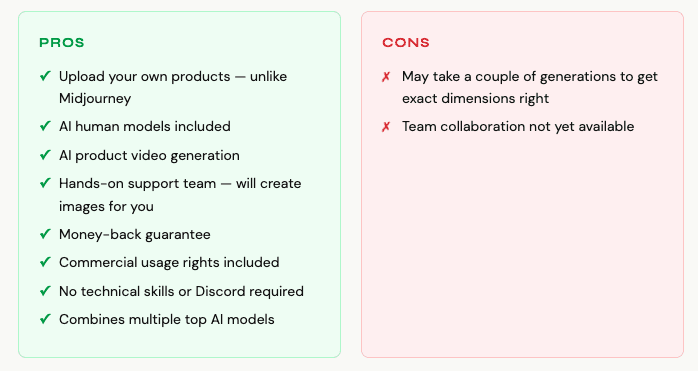
Caspa AI is built specifically for product photography and video. Upload one photo of your product and generate studio shots, lifestyle scenes, images with realistic AI models wearing or using your product, infographics, and short commercial-style videos. Because it generates the whole scene rather than compositing a cutout, lighting and shadows look coherent, which is exactly where editor-style tools struggle.
Pricing starts at $39/month for 500 credits (images), with video from $66/month. Every new account gets 10 free credits with no card, and there is a 30-day money-back guarantee, which none of the other tools on this list offer.
Best for: Amazon, Shopify and Etsy sellers, DTC brands, dropshippers, anyone who needs a continuous flow of listing and ad creative.
Weaknesses: web only (no mobile app), and credits-based pricing means very high-volume batch editing of existing photos is not its sweet spot.
Try Caspa AI free, no card required
2. Pebblely: Budget Pick for Simple Backgrounds
Pebblely does one thing: place your product into AI-generated background scenes, with 40+ themes and custom prompts. It is simple and cheap, with plans from $9/month for 30 images up to $39/month for 500.
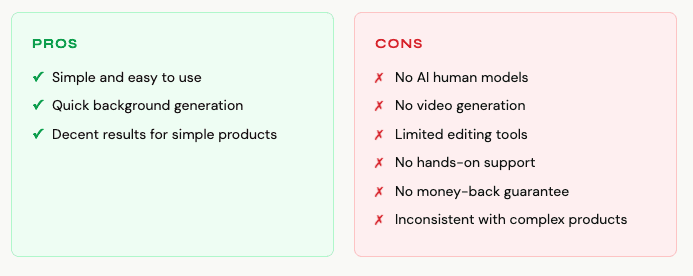
Best for: sellers with simple products (bottles, boxes, candles) who just need nicer backgrounds than a white sweep.
Weaknesses: no AI models, no video, no infographics, unused images expire monthly, and quality on complex or reflective products is inconsistent. There is also no money-back guarantee.
3. Flair AI: For Hands-On Scene Designers
Flair takes a design-canvas approach: you drag your product into a scene, arrange props and templates, then generate. Creative control is the point, and for brand teams who enjoy art-directing every shot it can produce distinctive results.
Best for: design-comfortable users building highly styled brand imagery.
Weaknesses: that control costs time; there is a real learning curve compared to prompt-and-go tools, and output consistency depends heavily on your scene-building skill. Video features are limited compared to dedicated generation.
4. Canva: When Product Photos Are a Side Task
Canva now includes AI image tools alongside its design suite. If your main job is making banners, social posts and store graphics, and product shots are occasional, staying inside Canva is reasonable.
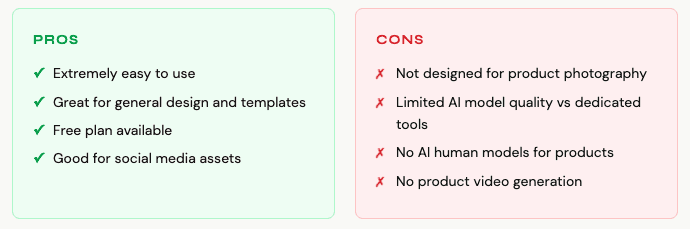
Weaknesses: it is a design tool with AI added, not a product photography platform. Photorealistic scenes with your actual product are not its strength, and neither is marketplace compliance.
Comparison at a Glance
| Caspa AI | Pebblely | Flair AI | Canva | |
|---|---|---|---|---|
| Lifestyle scenes with your product | Yes, generated | Yes, simpler | Yes, manual scene-building | Limited |
| Realistic AI models | Yes | No | Limited | No |
| Product videos | Yes | No | Limited | Basic |
| Infographics / A+ content | Yes | No | No | Yes, manual |
| Starting price | $39/mo (video from $66) | $9/mo | Free tier, paid from ~$10/mo | Free tier, Pro ~$12/mo |
| Free to test | 10 credits, no card | No free plan | Limited free tier | Free tier |
| Money-back guarantee | 30 days | No | No | No |
Our Recommendation
Test on your own products before paying anyone. Take the same three product photos, run them through your shortlist, and compare the outputs side by side against what you would actually publish. When sellers in our programs do this, Caspa’s generated scenes and on-model shots are most often the ones that survive the “would I put this on my listing?” test, and its free credits plus money-back guarantee make the trial genuinely risk-free.
Start with 10 free Caspa AI credits
For the full step-by-step workflow once you have picked a tool, see our guide to generating AI images with your products and our AI product video walkthrough.
FAQ
What is the best free Photoroom alternative?
For commercial use, none of the “free” tiers are truly free: Photoroom’s free plan blocks commercial use and Pebblely has no free plan. Caspa’s 10 no-card credits are the fastest way to get a few genuinely usable, commercially licensed images without paying.
Which Photoroom alternative makes videos?
Caspa AI is the only tool on this list that generates commercial-style product videos from a single photo. If video matters to you, that narrows the choice immediately.
Are AI product photos allowed on Amazon and Shopify?
Yes, as long as the image truthfully represents the product. Generated scenes and backgrounds are fine; misrepresenting the product itself is not. All four tools can produce compliant images, but check main-image rules (pure white background, no props) for Amazon specifically.
AI Education for All is a registered Canadian nonprofit. Caspa AI supports our free education programs, and our guides use it for worked examples; the assessments above are our own.
Enjoyed this guide? There's more every month.
Free AI guides, webinar invitations and volunteer opportunities, straight to your inbox.